
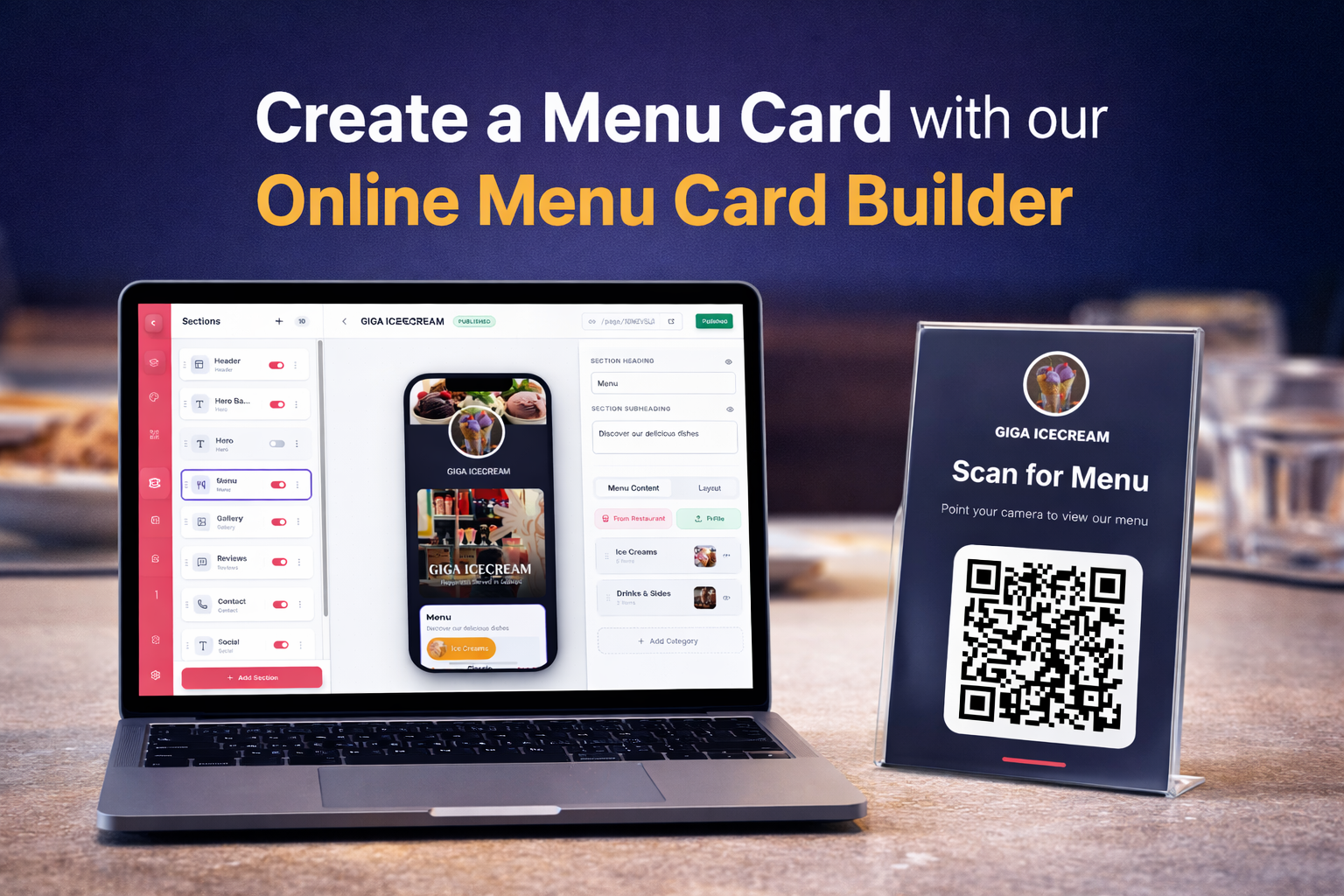
In today’s fast-moving restaurant industry, speed, convenience, and presentation matter more than ever. Customers don’t want to wait for physical menus, and restaurant owners don’t want the hassle of reprinting menus every time prices or items change.
That’s where a free QR code menu maker comes in — and if you’re looking for a simple, powerful, and beautifully designed solution, Menu Card Studio is built exactly for you.
This guide will walk you through everything:
- Why QR menus are important
- How to create your menu in 10 minutes
- Step-by-step setup (no coding required)
- And why Menu Card Studio stands out from other tools
🚀 Why Every Restaurant Needs a QR Code Menu
The shift to digital menus is no longer optional — it’s a necessity.
Here’s why:
1. Contactless Experience
Customers can simply scan a QR code and view your menu instantly on their phone. No physical contact needed.
2. Easy Updates
Want to change prices or add new dishes? Update your menu anytime — no reprinting cost.
3. Better Customer Experience
A clean, well-designed digital menu with images increases customer appetite and order value.
4. Cost Saving
Forget printing hundreds of menu cards. One QR code can serve unlimited customers.
⚡ Create Your Free QR Code Menu in Just 10 Minutes
Yes, it’s that simple.
With Menu Card Studio, you don’t need any technical skills, coding knowledge, or design experience. The platform is designed for restaurant owners, café managers, and food entrepreneurs.
Let’s walk through the process 👇
🧾 Step 1: Sign Up (Super Easy)
Getting started takes less than a minute.
You can sign up using:
- Google account (1-click login)
- Email registration
No complicated setup. No technical steps.
🏪 Step 2: Add Your Restaurant Details
Once you’re inside, the first step is to create your restaurant profile.
Add:
- Restaurant Name
- Phone Number
That’s it. Your base setup is ready.
📋 Step 3: Add Your Menu (2 Powerful Options)
This is where Menu Card Studio becomes truly powerful.
You get two ways to create your menu:
🔹 Option 1: AI Scanner (Fastest Way)
Already have a printed menu?
Simply:
- Upload images of your existing menu (page by page)
- The AI scanner automatically extracts items
This saves hours of manual work.
🔹 Option 2: Add Menu Manually
Prefer full control?
You can:
- Add categories (Starters, Main Course, Beverages, etc.)
- Add items, prices, descriptions
- Upload food images
This is perfect for new restaurants or redesigning menus.
✏️ Step 4: Edit & Customize Your Menu
Once your menu is added, you’ll see a live preview.
Now you can:
- Update menu items anytime
- Add or remove dishes
- Edit pricing instantly
No need to rebuild anything — everything is dynamic.
🎨 Step 5: Add Branding & Design
Your menu should reflect your brand — and this is where Menu Card Studio shines.
Customize:
- Restaurant logo
- Theme colors
- Font styles
- Font sizes
You can match your:
- Café vibe ☕
- Fine dining luxury 🍽️
- Street food energy 🍔
The design system is clean, modern, and conversion-focused.
🔳 Step 6: Design Your QR Code
Now comes the most important part — your QR code.
Inside the QR code tab, you can:
- Customize QR design
- Add colors
- Style it according to your brand
Once done:
- Download high-quality PDF
- Print and place on tables, walls, packaging, or standees
✅ Your Digital Menu is Ready!
That’s it.
In just 10 minutes, your restaurant now has:
- A live digital menu
- A scannable QR code
- A fully customizable design
No developer. No designer. No stress.
💡 Why Choose Menu Card Studio?
There are many QR menu tools out there — but here’s why restaurants are choosing Menu Card Studio:
⚡ 1. Lightning Fast Loading (CDN Powered)
Speed matters.
Menu Card Studio uses CDN (Content Delivery Network) technology to ensure:
- Fast loading menus
- Smooth experience for customers
- No lag even during peak hours
🎯 2. Designed by Experts (15+ Years Experience)
This isn’t just another tool.
It’s built by a design agency with 15+ years of experience in:
- Restaurant branding
- Menu design
- UI/UX optimization
Every component is crafted for:
- Readability
- Visual appeal
- Higher engagement
🎨 3. Beautiful & Professional Design
Most QR menu tools look basic.
Menu Card Studio focuses on:
- Clean layouts
- Modern UI
- Food-focused visuals
Your menu doesn’t just work — it sells.
🔄 4. Easy Updates Anytime
Change:
- Prices
- Items
- Offers
In seconds — without affecting your QR code.
📱 5. Mobile Optimized
Your customers will view the menu on mobile.
That’s why every menu is:
- Fully responsive
- Easy to scroll
- Clean and readable
🧠 6. Smart AI Menu Scanner
Save hours of work by:
- Uploading existing menu
- Letting AI convert it into digital format
This feature alone makes it worth using.
🧾 7. High-Quality Print Ready QR
Download QR codes in:
- High-resolution PDF
- Print-ready format
Perfect for:
- Table tents
- Standees
- Stickers
📊 QR Code Menu vs Traditional Menu
| Feature | QR Code Menu | Printed Menu |
|---|---|---|
| Update Cost | Free | Expensive |
| Speed | Instant | Slow |
| Hygiene | Contactless | Shared |
| Design Flexibility | High | Limited |
| Scalability | Unlimited | Restricted |
🧠 Pro Tips to Get Maximum Results
If you want to increase orders using your QR menu, follow these:
✅ Add Food Images
Photos increase ordering by up to 30%.
✅ Highlight Best Sellers
Guide customers toward high-profit items.
✅ Use Clear Categories
Make navigation easy.
✅ Keep Design Clean
Avoid clutter — focus on readability.
🎯 Who Should Use This?
Menu Card Studio is perfect for:
- Restaurants
- Cafés
- Cloud kitchens
- Food trucks
- Bars & lounges
Whether you’re just starting or scaling — this tool fits all.
🔥 Final Thoughts
If you’re still using printed menus, you’re losing:
- Time
- Money
- Customer experience
Switching to a QR code menu is one of the simplest upgrades you can make in your restaurant business.
And with Menu Card Studio, it’s:
- Free
- Fast
- Beautiful
- No coding required
🚀 Start Now – Create Your Free Menu in 10 Minutes
Don’t overthink it.
👉 Sign up
👉 Add your menu
👉 Customize design
👉 Generate QR
Your restaurant deserves a modern menu — and your customers expect it.
Leave a Reply