
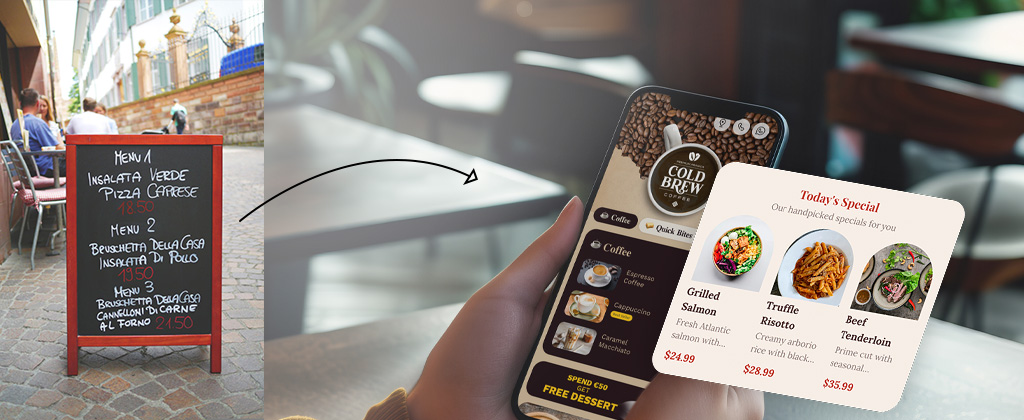
Digital menus have become one of the smartest upgrades restaurants can make today. In the past few years, I’ve worked with hundreds of restaurants designing menu cards, QR menus, and digital ordering experiences. One thing is very clear:
A good QR code menu doesn’t just show food items — it increases craving, improves customer experience, and boosts sales.
Most restaurants make a simple mistake. They convert their printed menu into a QR menu PDF and think the job is done. But a modern QR menu can do much more:
- Show food videos
- Highlight today’s specials
- Add quick service buttons
- Increase upselling
- Improve table service
In this guide, I’ll share 15 powerful QR code menu examples used by successful restaurants, cafes, and bars. These examples are based on real design experience and show how restaurants can turn a simple menu into a sales tool.
What Is a QR Code Menu for Restaurants?
A QR code menu is a digital restaurant menu that customers access by scanning a QR code using their smartphone. Instead of using printed menus, restaurants can show their menu online with photos, videos, and real-time updates.
QR menus became popular because they:
- Reduce printing costs
- Allow instant menu updates
- Improve hygiene
- Create interactive dining experiences
Modern QR menus can also include features like food videos, highlighted dishes, and service buttons such as Call Waiter or Request Bill.
Benefits of Using a QR Code Menu
- Easy to update menu items anytime
- No reprinting costs
- Better food presentation using photos and videos
- Faster table service
- Better upselling opportunities
15 QR Code Menu Examples for Restaurants
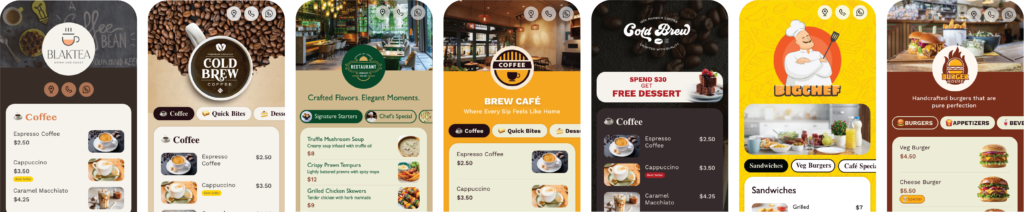
1. Classic Restaurant QR Menu Layout
This is the most common QR menu example used by restaurants. The structure includes categories like starters, main course, desserts, and drinks with item photos, descriptions, and prices.
Why it works: Customers already understand traditional menus, so the transition to digital is easy and intuitive.
2. Today’s Special Highlight Component
A dedicated Today’s Special section at the top of the menu highlights chef specials or seasonal dishes.
Why it works: Customers scanning a QR menu usually look for recommendations first. Highlighting specials increases impulse orders.
3. Video Menu for Popular Items
Instead of showing only text and photos, the menu includes short food videos like burgers being grilled or coffee being poured.
Why it works: Food videos trigger craving instantly.
Text menu shows information. Video menu creates hunger.
4. Quick Call-to-Action Service Buttons
Modern QR menus can include service buttons such as:
- Call waiter
- Request bill
- Clean table
- Order water
Why it works: It improves service speed and reduces the need to signal staff manually.
5. Category Icons Menu Layout
Icon-based navigation makes menus easier to browse.
- Burgers
- Pizza
- Salads
- Drinks
Why it works: Icons make navigation faster on mobile screens.
6. Popular Items Highlight Section
A Popular Items section highlights best-selling dishes.
Why it works: Customers trust social proof and are more likely to order dishes marked as popular.
7. Photo-Focused Menu Layout
This layout displays large food images for every item.
Why it works: Customers eat with their eyes first. Attractive photos increase orders.
8. Quick Order Button Menu
A quick Add to Order button allows customers to add items instantly.
Why it works: Reducing steps increases order completion and average order value.
9. Cafe Style Minimal Menu
Minimal menus are ideal for cafes with categories like coffee, beverages, snacks, and desserts.
Why it works: Cafe customers usually decide quickly, so simple menus improve speed.
10. Table QR Menu with Table Number
The QR menu automatically detects the table number when scanned.
Why it works: It helps staff identify where the request came from.
11. Combo Deal Menu Section
Combo sections group items together such as:
- Burger + Fries + Drink
- Pizza + Garlic Bread
- Coffee + Dessert
Why it works: Combos increase average order value.
12. Seasonal Menu Component
Seasonal sections can highlight limited-time dishes such as:
- Winter specials
- Summer drinks
- Festival menus
13. Multi-Language Menu
Tourist locations benefit from menus available in multiple languages such as English, German, Spanish, or French.
14. Bar & Drinks Menu Layout
Bars can create dedicated drink menus showing cocktail images, ingredients, and alcohol content.
15. Smart Upsell Menu Layout
The menu suggests add-ons when customers open an item.
Example: When viewing a burger, the menu suggests:
- Add fries
- Add cheese
- Add cold drink
Why it works: Upselling increases the total bill value.
Frequently Asked Questions
What is a QR code menu for restaurants?
A QR code menu is a digital menu that customers access by scanning a QR code using their smartphone.
Why do restaurants use QR code menus?
Restaurants use QR menus to reduce printing costs, update menus easily, and improve customer experience.
Can QR code menus increase restaurant sales?
Yes. Digital menus with photos, videos, and highlighted items can increase food cravings and upselling opportunities.
How do I create a QR code menu for my restaurant?
You can create a digital menu using an online QR menu builder and generate a QR code for your restaurant tables.
Create Your QR Code Menu
If you want to create your own digital QR menu with photos, videos, and interactive components, you can easily build one using an online menu builder.
Create Your Free QR Code Menu →
Leave a Reply