
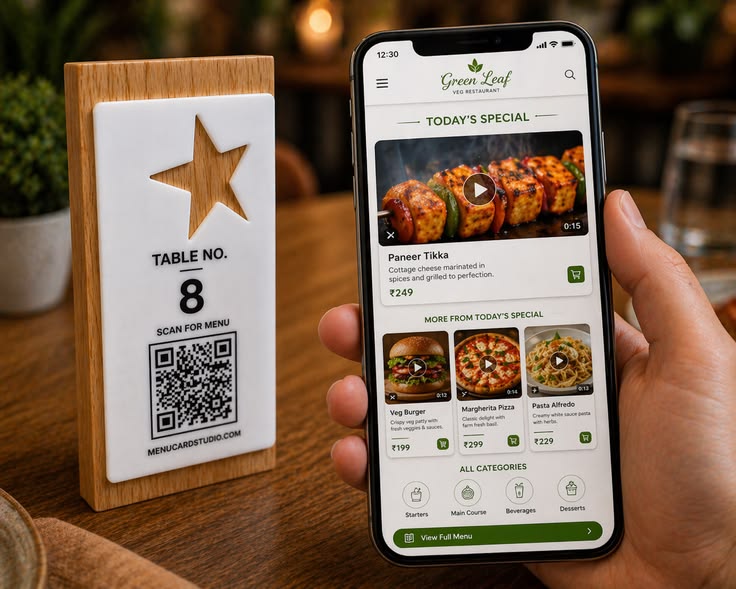
Most restaurants in India still believe a QR code menu is just a digital replacement of a printed menu.
That’s not how customers use it.
The moment someone scans your QR code…
👉 their behavior becomes fast, visual, and emotional
If you understand this, your menu will increase orders.
If you ignore it, your menu becomes invisible.
Let’s break down real customer behavior.
1. Customers Don’t Read — They Scan Visually
When a customer opens a QR code menu, they don’t start reading item names.
They:
- Scroll quickly
- Look for visuals
- Stop only when something grabs attention
What catches attention?
- Food images
- Bright colors
- “Best Seller” tags
- Anything visually different
👉 A text-heavy menu gets ignored instantly.
2. Images Drive Orders (Not Descriptions)
Customers don’t decide based on long descriptions.
They decide based on:
👉 “How good does this look?”
A simple shift:
- ❌ “Paneer Tikka – Cottage cheese marinated in spices…”
- ✅ Image of sizzling paneer with smoke + garnish
Which one sells more?
Always the visual.
Because:
👉 The brain reacts faster to images than words
That reaction = craving
Craving = order
3. Food Videos = Maximum Craving Trigger
Here’s where most restaurants are missing a huge opportunity.
After images, the most powerful element is:
👉 Short food videos
Why videos work:
- Show real texture
- Show freshness
- Show movement (melting, pouring, sizzling)
Example:
- Burger image = appealing
- Burger video (cheese pull) = irresistible
Customers don’t just see it…
👉 They imagine eating it
That’s when they order.
4. Customers Decide in 10–15 Seconds
This is critical.
After scanning:
- Customer scrolls
- Looks at a few items
- Decides quickly
👉 Total time: 10–15 seconds
If your menu:
- Has too much text
- Looks confusing
- Has no visual direction
👉 Customer delays decision or orders the safest item
But if your menu:
- Shows clear images
- Highlights best sellers
- Feels easy to browse
👉 Decision becomes fast → higher order value
5. Text-Heavy QR Menus Are Ignored
Let’s be honest.
Most QR menus today are:
- PDF uploads
- Long lists
- No images
Customer reaction:
👉 Scroll → skip → close mentally
People don’t want to read when they’re hungry.
They want:
- Quick understanding
- Easy selection
- Visual confirmation
6. What Actually Works (Based on Real Behavior)
If you want your QR menu to increase sales:
✅ Use Real Food Photography
Authentic, high-quality images of your actual dishes
✅ Add Short Food Videos
5–10 seconds clips showing:
- Cheese pull
- Pour shots
- Fresh serving
✅ Highlight Best Sellers
Guide decisions with:
- “Most Ordered”
- “Customer Favorite”
- “Chef Special”
✅ Keep Text Minimal
- Item name
- One-line description
- Price
That’s enough.
7. Your QR Menu Is a Sales Tool (Not a List)
Most restaurants treat menus as information.
Smart restaurants treat menus as:
👉 decision-making tools
That’s the difference between:
- Average order value ₹200
vs - ₹350–₹500 orders
Same food. Different presentation.
Final Insight
When a customer scans your QR code:
👉 You don’t get minutes
👉 You get seconds
In those seconds:
- Images grab attention
- Videos build craving
- Simplicity drives action
If your menu is just text…
👉 you lose the customer
If your menu creates craving…
👉 you increase orders automatically
Want a QR Code Menu That Actually Increases Orders?
At MenuCardStudio, we design QR menus based on real customer behavior, not assumptions.
- Visual-first layouts
- Food-focused design
- Built to increase order value
👉 If you want your menu to sell, not just display
Explore MenuCardStudio today.
Leave a Reply