
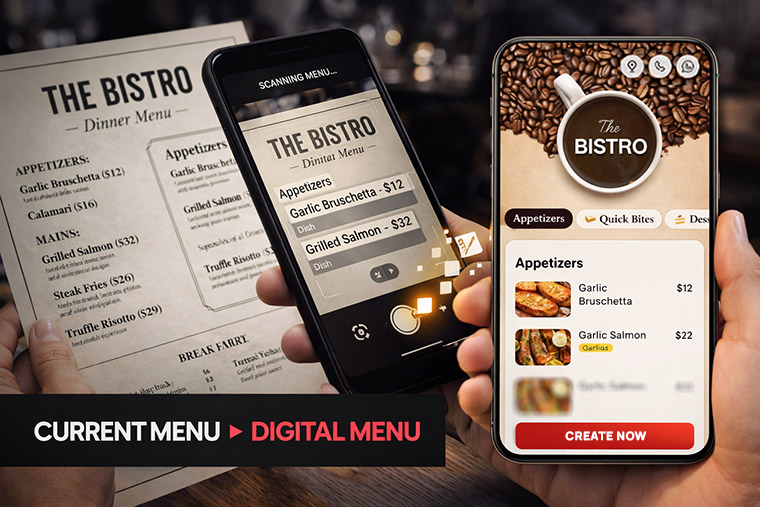
If you are a restaurant owner, café owner, or running a cloud kitchen, you probably still use a printed menu card in your restaurant.
But today many customers ask:
“Do you have a QR code menu?”
Customers are now used to scanning QR codes with their phones to view menus quickly.
So many restaurant owners ask us the same question:
“How can I convert my paper menu into a digital menu easily?”
The good news is — it is actually much easier than you think.
You don’t need technical knowledge.
You don’t need to build a website.
And you don’t need to type hundreds of menu items manually.
With modern QR code menu builders, you can convert your physical menu into a digital menu in just a few minutes.
In this guide, we’ll explain the easiest way to do it and why thousands of restaurants are switching to digital menus.
The Problem Most Restaurant Owners Face
Most restaurants already have a beautiful printed menu card.
But the problem starts when things change.
Maybe you need to:
- Increase prices
- Add a new dish
- Remove items that are not available
- Add combo offers
- Highlight special dishes
Every time this happens, you have to print new menu cards again.
Printing menus again and again costs money and takes time.
Another problem is that many customers now prefer contactless menus, especially after the pandemic.
This is why restaurants around the world are switching to digital QR code menus.
Why Restaurants Are Switching to Digital Menus
Digital menus are becoming very popular because they solve many problems for restaurant owners.
1. Customers Can See the Menu Instantly
Today almost every customer has a smartphone.
They simply open their camera and scan the QR code on the table to view your menu instantly.
No waiting for a waiter to bring the menu.
2. No More Reprinting Menu Cards
With printed menus, even a small price change means printing again.
With a digital menu you can update prices anytime in seconds.
No printing cost.
No waiting.
3. You Can Show Food Images
A printed menu usually has limited images.
But a digital menu allows you to add beautiful food photos that make dishes more attractive.
And when food looks attractive, customers order more.
4. You Can Highlight Special Offers
A digital menu allows you to promote:
- Combo offers
- Chef specials
- Best sellers
- Limited-time dishes
This helps increase your average order value.
5. Cleaner and More Modern Experience
Digital menus give your restaurant a modern and premium feel.
Customers feel your restaurant is updated and professional.
So What Is the Best Way to Convert Your Paper Menu?
There are a few ways to convert your menu into a digital format.
But some methods are easier and better than others.
Let’s look at them.
Method 1: Uploading a PDF Menu
Many restaurants simply scan their menu and upload it as a PDF online.
Then they generate a QR code linking to the PDF.
How it works
- Scan your menu
- Convert it to PDF
- Upload the file online
- Generate a QR code
Customers scan the code and open the PDF.
The Problem With PDF Menus
PDF menus are quick but not ideal because:
- Customers must zoom in to read
- Not optimized for mobile
- Hard to update items
- Looks less professional
Because of these issues, most restaurants prefer interactive digital menus instead.
Method 2: Adding a Menu Page on Your Website
Another option is creating a menu page on your restaurant website.
You manually add:
- Dish names
- Prices
- Categories
- Images
Then generate a QR code linking to that page.
Advantages
- Mobile-friendly
- Looks better than PDF
Disadvantages
- Requires website development
- Time-consuming
- Difficult for many restaurant owners to manage
Method 3 (Best Option): Use a QR Code Menu Builder
The easiest and smartest way is using a QR Code Menu Builder designed for restaurants.
These tools are built specifically to help restaurants convert their menu into a digital version quickly.
How it works
- Upload your menu images or PDF
- The system scans your menu
- It automatically extracts menu items
- You organize items into categories
- Generate your QR code
Now customers simply scan the QR code and view your menu instantly.
Convert Your Menu in Minutes Using AI
Modern menu builders now use AI menu scanning technology.
This is very helpful for restaurants with large menus.
Instead of typing everything manually, you simply upload your menu.
The AI detects:
- Dish names
- Prices
- Categories
- Sections
So if your menu has 200 items, the system can extract them automatically.
This saves restaurant owners hours of manual work.
What Makes a Good Digital Menu?
If you plan to convert your menu, make sure your digital menu includes these features.
Mobile-Friendly Design
Your menu should look perfect on smartphones.
Food Images
Customers are more likely to order dishes when they can see attractive photos.
High-quality food images create craving and excitement.
Food Preparation Videos Increase Cravings
One powerful advantage of a digital menu is the ability to show short food preparation videos.
When customers see food being prepared — for example:
- A burger with melted cheese
- Pizza coming fresh out of the oven
- Coffee being poured slowly
- Sizzling noodles in a wok
It immediately creates craving and appetite.
Visual content makes customers more excited to try dishes and often encourages them to order more items.
That’s why modern restaurants are adding high-quality food photos and short preparation videos to their digital menus.
To get the best results, restaurants should use:
- High-quality food images
- Short food preparation videos
- Clean plating and presentation
- Good ambience food photography
These elements make your menu look premium and professional.
MenuCardStudio Makes It Easy
MenuCardStudio is built specifically for restaurants, so it allows owners to easily upload:
- Product photos
- Food preparation videos
If you don’t already have food photos, MenuCardStudio also provides a free food photo library that restaurants can use to make their menu look attractive.
This helps restaurants create a visually appealing menu that increases customer cravings and improves order value.
Menu Categories
Clear categories like:
- Starters
- Burgers
- Pizza
- Main Course
- Beverages
- Desserts
help customers find items easily.
Easy Price Updates
Restaurant prices change frequently.
A digital menu should allow quick updates.
Promote Offers
Your menu should allow you to highlight:
- Best sellers
- Chef specials
- Combo deals
- Limited-time offers
These features help increase sales.
Where Should You Place Your QR Code?
Once your digital menu is ready, the next step is placing your QR code where customers can easily see it.
Common places include:
- Table stands
- Menu holders
- Table stickers
- Wall posters
- Restaurant entrance
- Bills and receipts
Some restaurants even print QR codes on food packaging for takeaway orders.
Digital Menus Work for All Types of Food Businesses
QR code menus are useful for many types of food businesses:
- Restaurants
- Cafés
- Burger shops
- Cloud kitchens
- Bars and lounges
- Food trucks
- Fine dining restaurants
Whether your menu has 20 items or 200 items, digital menus work perfectly.
The Future of Restaurant Menus
The restaurant industry is evolving quickly.
Digital menus are becoming a standard part of modern dining.
In the future, digital menus may include:
- Online ordering
- Table ordering
- Customer reviews
- Loyalty programs
- AI dish recommendations
Restaurants that adopt digital menus early gain a strong advantage.
Final Thoughts
If you still use a printed menu card, converting it to a digital menu is one of the smartest upgrades you can make.
Instead of dealing with constant printing and updates, a digital menu makes everything simple.
With modern QR code menu builders, you can convert your entire menu into a digital format in minutes.
Customers can scan, browse, and explore your dishes easily — while you save money and improve the dining experience.
If you want a fast and easy solution, platforms like MenuCardStudio allow restaurant owners to upload their menu and generate a professional QR code menu instantly.
✅ In simple words:
The best way to convert your physical menu into a digital menu is by using a QR code menu builder that scans and organizes your menu automatically.
It saves time, reduces printing costs, improves customer experience, and helps restaurants increase sales.
Leave a Reply